hide.me VPN Review: Pros, Cons, and Our Verdict
We tested hide.me on its free plan, during the Premium trial, and after buying a subscription. We measured speeds, downloaded torrents, checked streaming services, and tested for leaks and connection protection. This review explains what you get when you pay and which limitations are worth checking before you buy.
Quick verdict
hide.me is worth considering if you want high speeds, torrenting, and flexible VPN settings. Connections remained stable during extended use. The Premium trial required neither an email address nor a payment card and let us try the service before buying. In our tests, the trial matched the paid subscription in features and performance.
Our main concerns were signing in to Netflix through the US streaming location and DNS leaks during reconnections when Stealth Guard protected individual apps. The free plan is useful for everyday browsing but considerably slower than Premium.
Pros
- High Premium speeds, including torrent downloads.
- A full-featured Premium trial without an email address or payment card in the app we tested.
- Stealth Guard's whole-connection mode passed the scenarios we tested.
- Working split tunneling modes and easy access to manual configuration files.
- Fast responses through live chat and email.
- Our subscription's next renewal has the same price and duration as the initial purchase.
Limitations
- We could not sign in to Netflix with the VPN connected, although streaming worked after signing in first.
- Stealth Guard's app-specific mode exposed our ISP's DNS servers during reconnections.
- Bolt did not improve speeds on every route.
- Free-plan speeds are limited, and torrenting proved impractical.
How we tested
| Parameter | Test conditions |
|---|---|
| Location | San Diego, California, USA |
| OS and app | Windows 11 Home, hide.me 4.3.2 |
| Connection | Ethernet, AT&T, symmetrical 1 Gbps plan |
| Actual line speed | Approximately 950 Mbps download and upload |
| Main protocol | WireGuard |
| Plans tested | Premium trial, paid Premium, Free |
| P2P | qBittorrent and the official Ubuntu image torrent |
Our tables show speeds with the VPN connected. For repeated measurements, we use the median—the middle value of a series—so an unusually high or low result does not determine the outcome. For torrenting, we recorded the average speed of each complete download, then calculated the median of those averages.
We also checked for leaks during stable connections on all five available protocols. App-feature findings refer to the Windows version we tested.
Installation and the Premium trial
The official website has a dedicated apps section where you can choose your platform and download the installer without signing in. Downloading and installing the Windows app was straightforward. We did not encounter intrusive purchase prompts along the way.
The installer did not offer browsers or other software unrelated to the VPN.
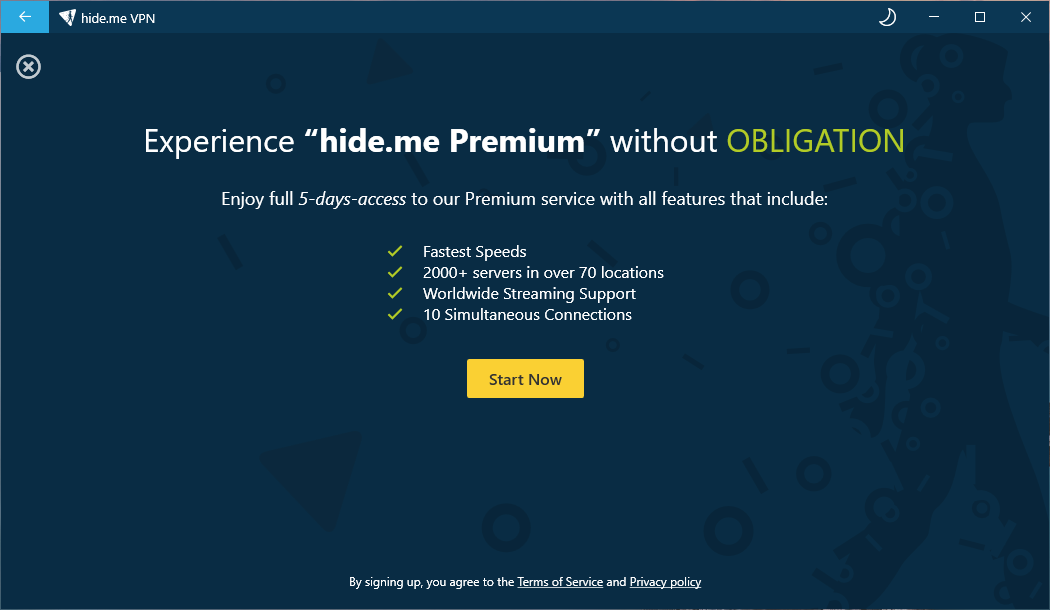
On first launch, hide.me displayed sign-in and account-creation options. Going back brought up a screen with Get Your Free Plan, where the app offered a short Premium trial.
Activation required neither an email address nor a payment card. Your Account showed Premium trial, and paid-plan features became available.
The trial lets you check your own sites, apps, and speeds before paying. This was the offer we received in the Windows app during testing.
It is important to distinguish Premium trial from the ongoing Free plan. The trial temporarily unlocks paid features; Free remains free but has restrictions.
First connection and everyday use
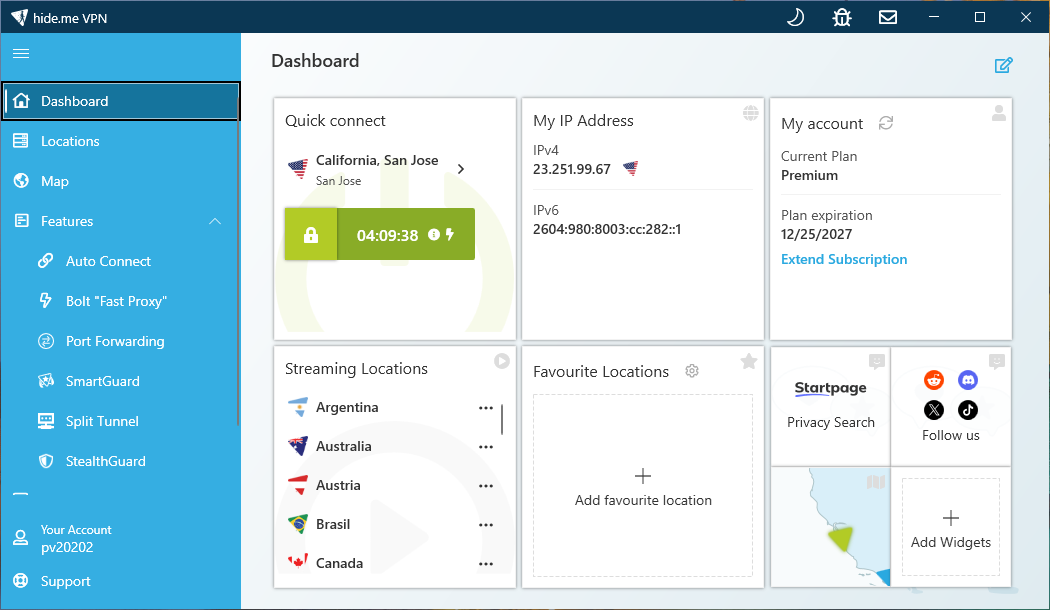
The main screen defaulted to the best-location option. From San Diego, the app connected to Los Angeles. Automatic protocol selection chose WireGuard.
Our measured connection time was approximately two seconds.
Kill Switch was enabled by default, while Split Tunneling was disabled. The app was also set to launch with Windows, but establishing a VPN connection initially required a manual click.
We repeatedly left the VPN connected throughout the day. The connection remained stable in all those sessions, with no disconnections.
Starting the app and connecting automatically
Two settings have different purposes:
- Launch on system startup starts the app with Windows.
- Connect on application start establishes a VPN connection when the app starts.
The second setting worked as expected when launching hide.me, starting the computer, and restarting Windows.
Results after sleep were inconsistent: sometimes the VPN reconnected, and sometimes it stayed disconnected. Do not rely on Connect on application start to guarantee reconnection after waking the computer.
Premium speeds
After testing the Premium trial, we bought a subscription and repeated the measurements.
Our computer was in San Diego. We connected to a selected hide.me VPN location, then measured speeds to a separate test server. For example, San Jose → Seattle means our computer in San Diego → the VPN server in San Jose → the speed-test server in Seattle. For New York, London, and Frankfurt, the VPN location and test server were in the same named city.
The table below shows paid Premium results without Bolt. Each row contains the medians of five measurements. We tested the San Jose VPN → Seattle test-server route in two series at different times of day.
| VPN location → test server | Download, Mbps | Upload, Mbps | Ping, ms |
|---|---|---|---|
| San Jose → Seattle, series 1 | 823 | 871 | 36.40 |
| San Jose → Seattle, series 2 | 813 | 868 | 35.60 |
| New York → New York | 703 | 503 | 60.70 |
| London → London | 442 | 208 | 149.60 |
| Frankfurt → Frankfurt | 444 | 215 | 153.85 |
In our tests, speeds fell as the VPN location became more distant from San Diego. The highest results came through the San Jose VPN server to the Seattle test server, followed by New York → New York, with European locations slower. That is a typical pattern for long-distance connections, although routing and network load also affect the result.
Readers elsewhere should take the starting point into account: these figures describe connections from California, not a universal ranking of hide.me's servers.
Does paid Premium differ from the trial?
The Premium trial gave us full access to the paid plan's capabilities. Our checks found no differences in functionality or performance after purchase. Median download speeds before and after paying were:
- San Jose VPN → Seattle test server: 822 Mbps in the trial; 823 Mbps on paid Premium following additional measurements.
- New York VPN → New York test server: 699 Mbps in the trial; 703 Mbps after purchase.
- London VPN → London test server: 432 Mbps in the trial; 442 Mbps after purchase.
- Frankfurt VPN → Frankfurt test server: 435 Mbps in the trial; 444 Mbps after purchase.
The trial lets you assess the service you will receive after buying a subscription.
Bolt: an accelerator worth testing on your route
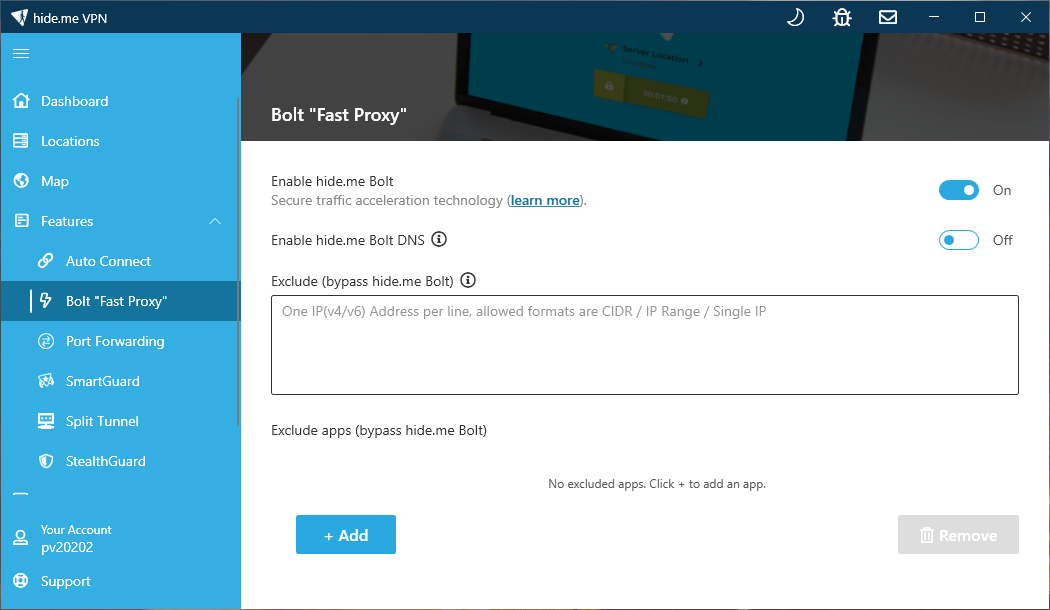
Bolt is designed to improve VPN speeds. We tested it with WireGuard, comparing measurements with the feature off and on. Results depended on the route: download speeds increased over shorter connections but decreased over longer ones.
The table shows medians from separate series, with five measurements per series except the first San Jose → Seattle comparison (six each), its repeat comparison (three each), and the first London series with Bolt (six). Values on the left are without Bolt; values on the right are with Bolt. All routes start in San Diego.
| VPN → test server | Download, Mbps | Upload, Mbps | Ping, ms |
|---|---|---|---|
| San Jose → Seattle, first series | 815 → 856.5 | 871 → 932 | 36.13 → 35.78 |
| San Jose → Seattle, repeat | 819 → 876 | 871 → 929 | 36.15 → 36.05 |
| New York → New York | 699 → 768 | 430 → 433 | 60.50 → 60.55 |
| London → London, first series | 409 → 393.5 | 180 → 146 | 157.15 → 147.85 |
| London → London, repeat | 408 → 379 | 178 → 156 | 157.35 → 149.35 |
| Frankfurt → Frankfurt, first series | 441 → 382 | 205 → 170 | 154.55 → 151.85 |
| Frankfurt → Frankfurt, repeat | 438 → 390 | 185 → 205 | 147.85 → 145.90 |
On the San Diego → San Jose VPN → Seattle test-server route, the improvement was repeatable: downloads increased by approximately 5–7%, and uploads by about 7%. Download speeds on the New York route rose by roughly 10%.
On the longer routes from San Diego to VPN and test servers in London and Frankfurt, downloads slowed instead. Repeat series confirmed that direction of change, while median latency decreased.
Upload performance varied: it improved in the second Frankfurt comparison, despite falling in the first.
Try Bolt both on and off at the location you intend to use. The speed differences in our measurements were substantial: the feature helped on some routes and slowed downloads on others. Median ping also fell in six of seven comparisons, although the difference on San Jose → Seattle was small. Compare both throughput and latency, then keep the setting that suits your needs.
How hide.me compares with other fast VPNs
On the San Diego → San Jose VPN → Seattle test-server route, paid Premium's 823 Mbps download result without Bolt would correspond to fifth place in the September 27–October 26, 2026 snapshot of our fastest VPN ranking.
With Bolt enabled, the median of all nine measurements across the two series was 872 Mbps download. That puts it on a level with the table's leader, NordVPN at 871 Mbps. A 1 Mbps difference is not a convincing lead, but it places hide.me with Bolt among the fastest VPNs we have tested.
The combined upload median with Bolt was 931 Mbps, above the figures for every other VPN in that top 10, where the highest upload result was 891 Mbps.
This compares our test series with a dated snapshot, rather than assigning hide.me a new position in the live ranking. The ranking uses medians from the latest completed day; this comparison combines two Bolt test series.
Torrenting on Premium
For P2P testing, we used qBittorrent and the official torrent for an Ubuntu image of about 6 gigabytes. The VPN was connected to San Jose.
On the paid subscription, we completed eight fresh downloads. For each, we recorded the average download speed reported by qBittorrent.
| Metric | Result |
|---|---|
| Complete downloads | 8 |
| Lowest average speed for an individual download | 383 Mbps |
| Highest average speed for an individual download | 584 Mbps |
| Median of the eight average download speeds | 474 Mbps |
We converted qBittorrent's MiB/s readings to the Mbps units used in ordinary speed tests.
Some downloads peaked at around 755 Mbps, but not every run reached that level. The main measure here is the average speed of a complete download, including slower periods at the beginning and end.
Torrent speeds varied between runs, while ordinary speed tests during the same period stayed within the ranges we had already measured. Those fluctuations therefore cannot automatically be attributed to a general drop in VPN performance.
During the Premium trial, the median of five complete-download averages was approximately 415 Mbps. Performance did not deteriorate after purchase.
Streaming: four services work, Netflix has a limitation
We tested five streaming services through hide.me's US connections.
| Service | Result |
|---|---|
| Amazon Prime Video | Playback works |
| Disney+ | Playback works |
| Hulu | Playback works |
| HBO Max | Playback works |
| Netflix | Playback works after signing in without the VPN; sign-in with the VPN connected failed |
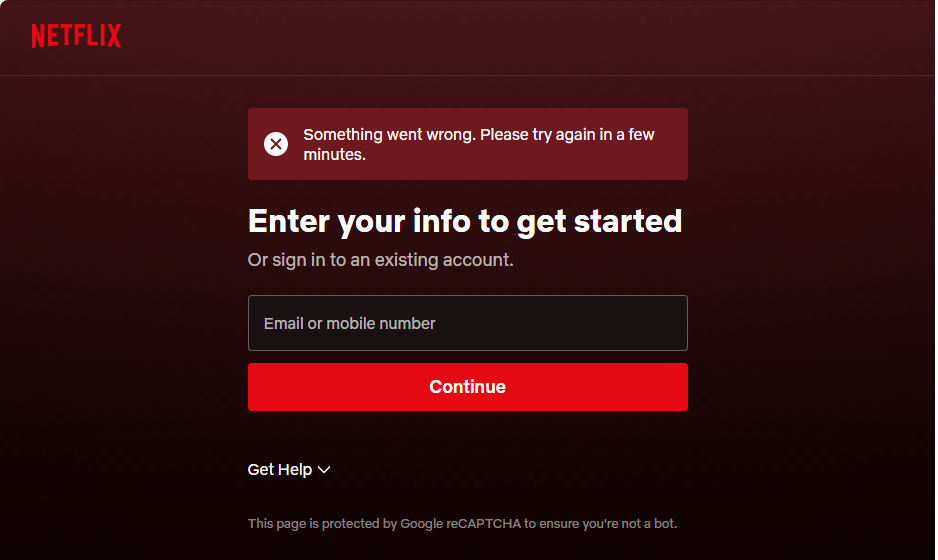
In the hide.me app, we opened Streaming, selected United States, and connected to the VPN. We then tried to sign in to Netflix in a browser, but neither email nor phone-number sign-in worked. Netflix displayed:
Something went wrong. Please try again in a few minutes.
Sign-in failed in Edge, Chrome, and Mozilla Firefox; incognito mode did not help either. We reconnected the VPN and tried again after 8 and 24 hours, with the same result.
The working option was to sign in to Netflix without the VPN, then connect hide.me and start watching. Playback worked normally in our test. If you need to sign in again, however, you may need access without the VPN again too.
Before buying, use the free Premium trial to test both account sign-in and playback. Our checks covered whether playback worked; we did not separately record video resolution or access to regional exclusives.
IP, DNS, and WebRTC leaks
During stable VPN connections, we checked for IPv4, IPv6, DNS, and WebRTC leaks on five protocols: IKEv2, OpenVPN, SoftEtherVPN, WireGuard, and SSTP. We detected no leaks on any of them.
We tested VPN disconnections, server changes, and waking the computer separately, using WireGuard.
Kill Switch and Stealth Guard
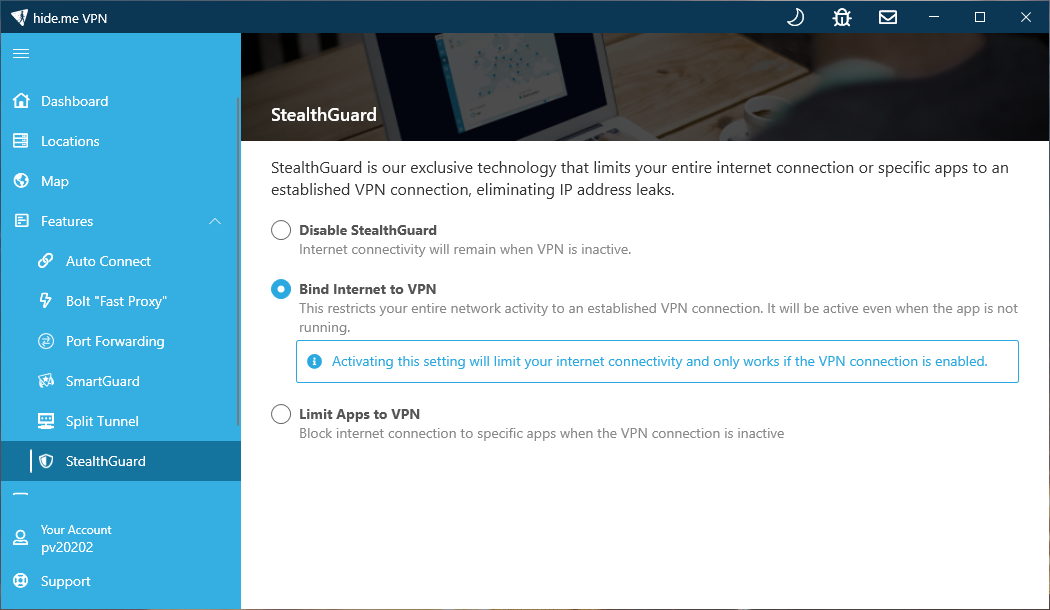
Kill Switch blocks traffic when it detects a VPN connection failure. Stealth Guard lets you set a persistent rule: the whole computer or selected apps can access the internet only through the VPN. We tested them separately.
Kill Switch
Stealth Guard was disabled for the Kill Switch test.
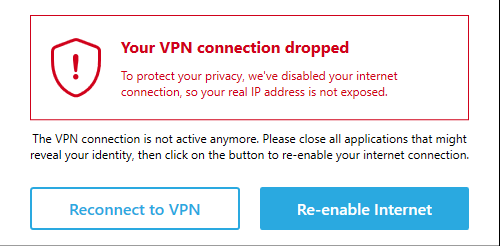
We unplugged the Ethernet cable while the VPN was connected. The app detected the lost connection and offered to restore the VPN or re-enable ordinary internet access.
After we plugged the cable back in, Windows could see the network connection again, but internet access remained blocked. Access returned only after we restored the VPN through the app. We detected no leaks during this test.
Sleep behaved differently. The VPN was connected and working before the computer went to sleep. After waking, the tunnel was inactive, but ordinary internet access was already available. In that state, the VPN no longer hides your public IP, and network traffic, including DNS, can go directly through your connection. You need to reconnect the VPN to restore protection.
Do not rely on Kill Switch as a persistent block on direct access during manual VPN server changes or reconnections. If you want to block internet access whenever the VPN is disconnected, use Stealth Guard.
Stealth Guard for the whole connection
This mode is useful when you want to block all internet access without the VPN, including after closing the app. We tested it with Kill Switch disabled.
| Scenario | Observation |
|---|---|
| VPN disconnected | Internet blocked |
| VPN connected | Internet works |
| Manual VPN disconnection | Internet blocked again |
| Changing VPN location | No leaks detected in our checks |
| Ethernet disconnected and cable reconnected | Access returned after restoring the VPN; no leaks detected |
| Sleep → wake | VPN inactive; internet blocked until reconnection |
| Exiting the app | Internet remains blocked |
| Ending the process through Task Manager | Connection ends; internet is blocked |
| Relaunching hide.me | Access returns after connecting the VPN |
| Check after restarting Windows | Access without the VPN remained blocked |
| Disabling Stealth Guard | Ordinary internet access restored |
Switching between Ethernet, Wi-Fi, and a hotspot was not part of these checks.
Stealth Guard for selected apps
In Limit Apps to VPN mode, we added Chrome and left Edge outside the list.
Without the VPN, Chrome had no internet access while Edge continued to work. Connecting the VPN restored Chrome's access; disconnecting blocked it again.
Chrome also remained blocked after sleep, exiting hide.me, and ending its process through Task Manager. Relaunching the app and restoring the VPN brought access back. Removing Chrome from the list lifted the restriction.
We detected no public IP leaks in these checks. However, the test in the protected Chrome browser showed our ISP AT&T's DNS servers in two scenarios: selecting a different VPN server while already connected, and manually disconnecting before reconnecting to the same location.
Split tunneling
Split tunneling lets you choose which apps use the VPN. Both modes available in Windows worked as expected.
| Mode | Our test result |
|---|---|
| Do not allow selected apps to use the VPN | Selected app Chrome showed the AT&T IP; Edge showed the VPN IP |
| Only allow selected apps to use the VPN | Selected app Chrome showed the VPN IP; Edge showed the AT&T IP |
This is useful when some apps should use the VPN while others use the ordinary connection.
Split tunneling controls traffic routing while the VPN is connected. To prevent an app from accessing the internet without the VPN, use Stealth Guard separately.
We checked both split tunneling modes on Free, Premium trial, and paid Premium. They worked the same way on all three.
SmartGuard: ads and malicious websites
SmartGuard substantially reduced advertising on the pages we checked. Empty spaces often remained where ads had been blocked.
Malware Protection also worked in a separate check: a site known to us as malicious would not open with the VPN connected and the feature enabled. Turning off Malware Protection alone made the site accessible again while the VPN remained connected.
Our Malware Protection check was limited to that one site.
SmartGuard is unavailable on the free plan.
Manual setup: WireGuard and OpenVPN configurations
You can use hide.me without its own app. Ready-made OpenVPN configurations and a WireGuard configuration generator are easy to find in the account dashboard. You do not need to contact support or assemble connection settings by hand.
For OpenVPN, open VPN Features → Server Locations, choose a location, and download the configuration for your platform. The separate WireGuard section lets you generate keys or use your own, select a location, and download a ready-to-use connection file.
These files are useful for several setups:
- VPN on a router. A compatible router connects to hide.me and routes traffic from all or selected home devices through the VPN, depending on its settings. This can cover a TV, game console, or another device that cannot run the hide.me app.
- Another VPN client on a computer or phone. Import the configuration into a compatible WireGuard or OpenVPN client to use hide.me through your preferred app.
- Manual Linux and other compatible-system setups. The files let you configure a connection using supported system tools, including the command line, without the provider's graphical app.
Your router or client must support the relevant protocol. hide.me app features such as Stealth Guard do not transfer with the configuration file: routing and blocking access after a VPN failure need to be configured on the device you use. WireGuard in a separate client, OpenVPN on OpenWrt, OpenVPN on Linux
We checked how easily configurations could be obtained from the dashboard. We did not separately test router or third-party-client speeds and leak protection.
Free plan: useful features, limited speeds
After the Premium trial expired, the app's connect button was disabled. Renew now offered Downgrade to Free Plan or Upgrade now. We chose Downgrade to Free Plan and continued using the free version.
Seven countries were available: Finland, France, Germany, the Netherlands, Switzerland, the United Kingdom, and the United States.
| Feature | Free in the app we tested |
|---|---|
| All five VPN protocols, including WireGuard | Available |
| Kill Switch | Available |
| Stealth Guard | Available |
| Split Tunneling | Available |
| Auto Connect and Lock App | Available in the interface |
| Bolt | Unavailable |
| Port Forwarding | Unavailable |
| SmartGuard | Unavailable |
| Streaming locations | Unavailable |
| Multihop | Unavailable |
Free-plan speeds
We could not repeat the San Jose VPN → Seattle test-server route on Free because no US West Coast VPN server was available to us.
The US connections were identified as Kansas City and Ohio. Those location labels come from IP geolocation, not verified physical equipment addresses.
The series medians showed broadly similar speeds across the routes tested: around 25 Mbps download and 6 Mbps upload. These throughput figures are approximate; the main difference between routes was latency.
| VPN region → test server | Median ping, ms |
|---|---|
| USA, Kansas City → New York | 83.83 |
| USA, Ohio → New York | 81.40 |
| United Kingdom → London | 135.00 |
| Germany → Frankfurt | 171.45 |
Similar throughput on different routes is consistent with a free-plan speed limit.
We downloaded more than 30 gigabytes without encountering a data-volume restriction or additional slowdown.
We observed no disconnections during ordinary use and encountered no intrusive Premium upgrade prompts.
Torrenting on Free
P2P performed much worse than ordinary speed tests. We tried different protocols and times of day, but qBittorrent's reported average download speed did not exceed approximately 118 Kbps—about 0.12 Mbps.
At that speed, torrenting on Free was impractical in our tests.
Who runs hide.me?
The service is operated by eVenture Ltd., a Malaysian company with an address in Labuan. hide.me launched in 2012; its founder is Sebastian Schaub. Terms of service, company details, founder profile
The company presents hide.me as an independent VPN provider. In an i2Coalition interview, Schaub said the service was not part of a large corporate group. We found no confirmation in the sources reviewed of a subsequent acquisition or membership in a group with multiple VPN brands. Those materials do not disclose a complete current shareholder structure. i2Coalition interview
No-logs policy, audit, and RAM-only servers
What data is retained?
hide.me says it does not retain browsing or activity history within the VPN, or logs linking incoming and outgoing IP addresses with timestamps or session duration.
The privacy policy nevertheless describes temporary diagnostic records with a random username and internal IP address, traffic counters, account email addresses, and support correspondence. Website access logs, including IP addresses, are covered separately. No-logs therefore means no VPN activity history, rather than no customer data of any kind. Privacy policy
The documents differ on when temporary diagnostic records are deleted: the policy says every few hours, while the architecture explanation says at the end of a session.
What supports the no-logs claim?
Securitum assessed the no-logs policy in 2024 and reached a positive conclusion within the audit's scope. The assessment covered server configurations, deployment procedures, and a supplied representative server-environment image.
The report refers to the product's state as of March 15, 2024. It is not continuous monitoring of the network or an audit of every app. We found no newer published technical no-logs audit in the sources reviewed. Securitum report
What do RAM-only servers provide?
According to hide.me, all VPN exit servers use RAM-only infrastructure: working data is held in memory and disappears after a restart. This reduces the risk of data remaining on a local disk. Infrastructure description
RAM-only is a useful technical measure, but does not by itself establish that no logging or transfer to another system occurs. The network-wide claim comes from the provider and should be distinguished from the audit's specific scope. hide.me's RAM-only explanation
Pricing, payment, and refunds
For this review, we bought 14 months of Premium for $54.99, equivalent to approximately $3.93 per month over the full term.
Renewing at the same price is a separate advantage. Our order confirmation lists the next payment for another 14 months at $54.99. The subscription price does not rise after the first term. Potential changes to the total due to taxes are noted separately in the confirmation.
Current plans and payment methods
When checked on November 4, 2026, the official pricing page displayed these offers in US dollars:
| Plan | Payment for the full term | Monthly equivalent |
|---|---|---|
| 1 month | $11.99 | $11.99 |
| 12 + 4 extra months: 16 total | $54.99 | $3.44 |
| 24 + 6 extra months: 30 total | $69.99 | $2.33 |
| Free | $0 | $0 |
Longer subscriptions are paid in full upfront. Extra months depend on the promotion: our $54.99 purchase covered 14 months, while the current offer covers 16. The page also states that plans renew at the same price and for the same duration. Plans and prices
hide.me accepts Visa, Mastercard, American Express, and Diners Club cards, PayPal, Apple Pay, Google Pay, SEPA, SOFORT, and bank transfers. Cryptocurrency options include Bitcoin, Ethereum, Litecoin, Dogecoin, Solana, USDT, and USDC. Its help page specifies Ethereum (ERC-20) for USDT and USDC. Payment methods
Refunds
hide.me publishes a 30-day money-back guarantee with conditions: it applies to the first order, not renewals, and requires no previous refund claim and no violation of its terms. Purchases through app stores follow the respective store's refund rules. Refund terms
Cryptocurrency refunds: the published general terms do not list a separate exclusion for crypto payments, but we found no explicit explanation of how the guarantee applies to them or how those refunds are processed. This remains an open question pending clarification from support. Refund policy
Cancelling automatic renewal and requesting a refund are separate actions. Our order confirmation explicitly states that cancelling the subscription stops future charges but does not itself refund the purchase.
Requesting a refund was straightforward and quick. We emailed support@hide.me on November 4 at 5:33 p.m. An automated acknowledgement arrived immediately, and a staff member confirmed referral to billing five minutes later. We were asked no additional questions.
At 3:05 a.m. the next day, payment partner Cleverbridge confirmed that the full $54.99 refund had been issued. That was 9 hours 32 minutes after our request. Support also confirmed cancellation of the subscription.
The money also reached our bank account: the entire process, from sending the request to receiving the funds, took no more than one day. Refund confirmation arrived after 9 hours 32 minutes; we did not separately record the exact time the bank credited the funds. Crediting times for other customers may vary depending on the payment method and processing by their bank or payment service.
Support response times
We tested two contact channels: the website's live chat and email support.
| Channel and stage | Wait time |
|---|---|
| Staff response in live chat | Almost immediate |
| First staff response by email | 3 hours 28 minutes |
| Follow-up email with recommendations | 5 hours 19 minutes after the original request |
Support made a good impression for responsiveness: the chat conversation started immediately, and email follow-up arrived within a few hours. These are the timings of our enquiry, not guaranteed response times for every customer.
Should you buy hide.me?
hide.me is a strong candidate if you want high speeds, Premium torrenting, and flexible control over your connection. It remained stable during extended use in our tests, and the trial provided the same level of features and performance as the paid subscription.
Same-price renewal is another advantage: our next subscription term costs the same and lasts as long as the first. Costs after the initial period remain predictable.
Two limitations deserve attention: Netflix sign-in failed with the VPN connected, and app-specific Stealth Guard allowed DNS leaks during reconnections. For blocking all internet access without the VPN, Stealth Guard's whole-connection mode performed better. Free is useful for everyday browsing, but our torrenting results point to Premium for P2P use.
Start with the free Premium trial: check the sites and apps you need, and compare speeds with Bolt on and off. For Netflix, test the whole process from account sign-in to playback. Being able to do this without an email address, payment card, or upfront payment is one of hide.me's most useful advantages.
The refund was straightforward too: no additional questions were asked, and the entire process from requesting it to receiving the funds in our bank account took no more than one day.